Website profiles · Technology insights · Alternatives

simplenote.com

The simplest way to keep notes. Light, clean, and free. Simplenote is now available for iOS, Android, Mac, and the web.

No paid content found
Visit website
Profile views 7 Outbound visits 12 Normal
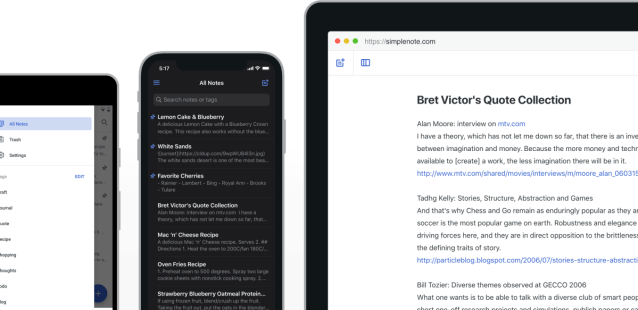
Simplenote Full homepage screenshot

At a glance

Category
Productivity
Language
English
Paid-content signal
No paid content foundObserved
Registered
2004
Hosting
Automattic, IncInferred
HTTPS certificate trusted
PassedObserved
Last updated

Website review

This review may include AI-generated content and is not individually verified. Domain, certificate and other facts come from the observed data on this page.

What is Simplenote?

Simplenote is a free, lightweight note-taking app built around plain text and automatic syncing. Its pitch is “comprehensive underneath, simple on the surface”: you get a fast, distraction-free editor, and your notes stay updated across devices in real time without a manual sync button.

It runs on iOS, Android, Mac, Windows, Linux and in a browser, so it suits people who switch between a phone, a laptop and a work computer and don't want to think about where a note lives. Core features include tags for organizing and instant search, Markdown writing with preview and publishing, a full history of changes so you can look back at earlier versions, and sharing or publishing notes for collaboration or public reference.

The trade-off is deliberate simplicity. If you need nested notebooks, databases, drawing, or heavy formatting, Simplenote will feel too bare. If you mainly capture text — meeting notes, lists, drafts, snippets — the lack of structure is the point.

A practical next step: install it on two devices, create one note with a tag, and edit it on both to confirm the real-time sync and search behavior match how you work. For a broader comparison of note apps, see Zapier.

How does Simplenote sync notes across my devices without a sync button?

Simplenote syncs in the background: when you edit a note on one device, the app sends the change to Simplenote's servers and pushes it to your other signed-in devices automatically. There is no manual "sync" step because the app treats syncing as a continuous process rather than a command you trigger. The page describes it as "automatically and in real time," with no sync button: "It just works." It also notes that notes are backed up with every change, so you can look back at earlier versions.

H3 How this plays out in practice

  • You jot a grocery list on your phone; by the time you open your laptop, the list is already there.
  • You edit a shared to-do list on the web; the change reaches other devices without anyone pressing refresh.
  • If you go offline, you can keep writing; changes reconcile once the device reconnects, though the page does not detail conflict handling.

H3 What you give up

Automatic syncing is convenient, but it depends on staying signed in and having a connection at some point. If you need to control exactly when data leaves your device, or you work in an environment where background network activity is restricted, a manual-sync tool may suit you better. For most people who want notes to simply appear everywhere, the trade-off is worth it.

A practical next step: install Simplenote on two devices, sign in with the same account, and edit one note on each while watching the other screen. That quick test tells you whether the real-time behavior matches how you work. You can get it at Simplenote.

Can I share and collaborate on notes with others using Simplenote?

Yes. Simplenote supports several ways to share notes, though it is not a full real-time collaboration suite like Google Docs or Notion.

How sharing works

  • Publish a note online: You can publish a note to a public URL, which is useful for sharing instructions, a list, or a reference document with anyone.
  • Share a to-do list or note: You can send a note to someone so they can view or use it, for example a shared checklist or a set of instructions.
  • Markdown publishing: If you write in Markdown, you can preview and publish that note, which is handy for sharing formatted text without sending a file.

What it is good for A practical scenario: you want to give a colleague a quick packing list, a set of steps, or a shopping list. You write it in Simplenote, publish it, and send the link. The other person does not need to install anything to read it.

The trade-off Simplenote is built around simple, fast notes rather than live co-editing. If two people need to edit the same document at the same time and see each other's changes instantly, a dedicated collaborative editor will fit better. If you mainly need to write something once and share it, or keep a shared list that one person updates, Simplenote is enough.

Next step Decide which you need: a link you can send to anyone (publish the note), or a note you hand to a specific person (share it directly). If you need simultaneous editing, test that requirement first before committing.

Does Simplenote support Markdown for writing and publishing notes?

Yes. Simplenote supports Markdown for writing, previewing and publishing notes, according to the product page.

In practice that means you can type plain Markdown in the editor, check the rendered result before sharing, and publish a note online if you want a quick public page rather than a document you email around. The rest of the app stays deliberately plain: notes sync automatically across devices, tags and instant search handle organisation, and every change is backed up so you can look back at earlier versions.

If Markdown is your main reason for choosing a notes app, test it against your actual workflow rather than just the feature list. A useful first step is to write one note with headings, a list, a link and a code block, then preview it and publish it. That single test shows whether the preview matches what you expect and whether the published page looks acceptable to the people you share it with.

Simplenote is a reasonable fit if you want lightweight, cross-platform notes with Markdown and publishing. It is a weaker fit if you need a rich formatting toolbar, complex tables or a full publishing platform with custom domains and layouts. In that case, compare it with a more format-heavy editor before committing.

For a concrete scenario: a developer jotting release notes, a student keeping lecture summaries, or a small team sharing a to-do list can all work in Markdown here and publish a note when someone outside the group needs to read it. Someone writing long reports with embedded images and styled layouts will likely find the plain-text approach limiting.

Start at Simplenote and try the Markdown preview and publish flow on one real note.

Is there a way to recover previous versions of my notes in Simplenote?

Yes. Simplenote keeps a backup of every change, so you can open a note's history and restore an earlier version. The site describes this as going "back in time" to see what a note looked like last week or last month.

How it works in practice

  • Each edit creates a saved revision rather than overwriting the old text.
  • You view the note's version history and pick the point you want.
  • Restoring brings that earlier content back into the current note.

When this matters

A student revising a lecture summary can recover a paragraph deleted by mistake. A writer can compare an earlier draft against the current one before publishing. Someone sharing a to-do list with a colleague can undo an accidental mass deletion.

Deciding whether it fits

If you mainly need a lightweight, cross-platform place for plain text, the revision history is a useful safety net that requires no extra setup. If you need granular, named versions with side-by-side diffing or long-term archival control, a dedicated version-control or document tool may suit you better.

As a next step, open one note you edit often, make a small change, then check its history so you know exactly where the restore option sits before you actually need it.

How does Simplenote compare to other note-taking apps in terms of simplicity and cost?

Simplenote is deliberately simpler and cheaper than most note-taking apps: it strips note-taking down to plain text with tags, sync and version history, and it is free across iOS, Android, Mac, Windows, Linux and the web. Its own page describes it as “comprehensive underneath, simple on the surface,” with automatic real-time sync, no sync button, instant search, Markdown support, note sharing/publishing, and backups of every change. The trade-off is that this simplicity is the whole product: there is no rich formatting toolbar, no built-in task manager, no database-style tables, and no elaborate notebook hierarchy beyond tags.

Cost is where Simplenote stands apart. The page states plainly that “Apps, backups, syncing, sharing – it’s all completely free.” Many comparable apps use a free tier with paid upgrades for features such as more devices, larger uploads, version history, or collaboration. If your priority is a notes app that will not push you toward a subscription, Simplenote is one of the clearest options.

How it compares in practice

Dimension Simplenote’s approach What you may give up
Simplicity Plain-text notes, tags, instant search, Markdown Rich text, embedded files, complex notebooks
Cost Free apps, syncing, backups and sharing Paid support tiers or extra collaboration features
Sync Automatic and real time across devices Selective or manual sync controls
Organization Tags and search Deep folder trees, databases, kanban boards
History Backups with every change Fine-grained version comparison tools
Sharing Share to-do lists, instructions, or publish notes Full team workspaces with permissions

If you want a fast, low-friction place for text notes, Simplenote is a strong fit. If you need visual planning, file attachments, or team administration, a more feature-heavy app will suit you better. A useful next step is to list the three things you actually do with notes — capture, retrieve and share — and check whether plain text plus tags covers them. If it does, Simplenote’s free, cross-platform model is hard to beat; if not, choose the app that solves the missing piece. For a broader comparison, you can look at Evernote for richer capture and organization, Notion for databases and team workspaces, or Obsidian for local plain-text notes with a plugin ecosystem.
Related questions

More questions →
Is Simplenote Completely Free?

Yes. According to Simplenote's own site, the core product is free: "Apps, backups, syncing, sharing – it's all completely free." There is no paid tier mentioned for these features, and the site does not describe a premium version or a subscription requirement to use them. If your question is simply whether you can take notes, sync them, back them up, and share them without paying, the answer from the available information is yes.

What "free" covers

The site lists the main capabilities and places them under the same free claim:

  • Apps on every platform — iOS, Android, Mac, Windows, Linux, and the browser.
  • Real-time syncing — notes update across devices automatically, with no sync button.
  • Backups — notes are backed up with every change, so you can look back at earlier versions.
  • Sharing and publishing — share a to-do list, post instructions, or publish notes online.
  • Tags and instant search — organize and find notes quickly.
  • Markdown support — write, preview, and publish in Markdown.

The phrase "it's all completely free" is attached to "apps, backups, syncing, sharing," which are the features most likely to sit behind a paywall in other note apps. That is the strongest signal on the page that there is no hidden charge for normal use.

What the page does not say

A few things are worth being precise about, because "free" claims can hide limits:

  • No pricing page or payment platform is listed. The site's pricing signals include the words "subscribe" and "subscription," but no pricing links or payment platforms appear in the available data. That means the page does not document a paid plan, but it also does not explicitly rule out one existing elsewhere.
  • No storage limits are stated. The site does not mention a cap on the number of notes, size, or sync history. Absence of a stated limit is not the same as an unlimited guarantee.
  • No account requirement details. The page offers a "Sign up now" option, but it does not explain what signing up involves or whether an account is mandatory for every platform.

So the accurate reading is: everything Simplenote advertises on its homepage is described as free, and no paid tier is presented there. Treat that as the supported claim rather than assuming features beyond what the page lists.

How to confirm it for yourself

If you want certainty before committing your notes, do this:

  1. Open simplenote.com and look for any pricing, upgrade, or subscription link in the navigation or footer. The available page data shows none, but the live site is the authority.
  2. Install the app for your platform and sign up. The sign-up flow is where a paid tier would normally appear if one existed.
  3. Test the features you actually care about — sync a note between two devices, check version history, and try publishing a note. If all of these work without a payment prompt, the free claim holds for your use case.

Who this fits

Simplenote is a reasonable choice if you want a lightweight, cross-platform notes app and cost is your main concern. The free claim covers the essentials: writing, syncing, backup, and sharing. It is less suited if you need features the page never mentions — for example, end-to-end encryption details, team administration, or a guaranteed storage quota — since those are not documented here. For those, you would need to check the app itself or its support documentation rather than rely on the homepage.

What Features Does Simplenote Offer for Organizing and Sharing Notes?

Simplenote's organizing and sharing features are built around four things: tags with instant search, shared or published notes, automatic version history, and Markdown support. All of them are available across iOS, Android, Mac, Windows, Linux, and the browser, and the site states that apps, backups, syncing, and sharing are "all completely free." If you want a lightweight, cross-platform notes tool rather than a full project-management system, these features cover the core workflow.

Organizing notes with tags and instant search

Simplenote keeps organization deliberately minimal. Instead of folders or notebooks, you add tags to notes and then find them through instant searching.

  • Tags act as your categories. A note can carry more than one, so the same note can sit under both a project tag and a status tag.
  • Instant search filters as you type, so tags and keywords surface notes immediately rather than after a separate search step.
  • Because there are no nested folders, the mental model is flat: tag first, search later. This works well when you have many short notes but can feel loose if you expect a strict hierarchy.

A practical pattern: tag by context (work, recipes, travel) and add a second tag only when it earns its place (urgent, 2025). Over-tagging defeats the speed that instant search is meant to provide.

Sharing notes and to-do lists

Simplenote supports three distinct sharing behaviors, and they serve different purposes:

Method What it does Best for
Share a note or to-do list Gives another person access to a specific note Collaborative lists, instructions, handoffs
Publish a note online Makes a note available as a web page Reference material you want to link to
Markdown publish Writes, previews, and publishes in Markdown Formatted public notes

The site describes this as: "Share a to-do list, post some instructions, or publish your notes online." So the sharing model is note-level, not workspace-level — you share what you choose, not an entire account.

One thing to decide before you rely on this: publishing a note makes it reachable online, so treat published notes as public content and keep anything sensitive in private, shared-only notes.

Version history: every change is backed up

Simplenote backs up notes with every change, which means you can look back at what a note contained last week or last month. The site frames this as "Go back in time."

This matters most in two situations:

  • You edited a note and want the earlier wording back.
  • You share a note with someone and want to see how it changed over time.

Because backups happen per change rather than on a schedule, you don't need to remember to save versions manually — but you also shouldn't treat it as a formal archive with named snapshots. It's a recovery and review tool, not a document-management system.

Markdown: write, preview, publish

Markdown support lets you write notes in Markdown format, preview the rendered result, and publish in that format. For anyone who writes structured notes — checklists, code snippets, formatted instructions — this removes the need to switch to a heavier editor just to get formatting.

The workflow is straightforward: write in Markdown, preview to confirm the rendering, then publish if the note is meant to be shared publicly.

How syncing ties it together

Organizing and sharing only work if the notes are current everywhere. Simplenote syncs notes across all your devices automatically and in real time, and the site notes there is no "sync" button — "It just works." That means a tag you add on your phone is searchable on your laptop, and a shared list updates for everyone without a manual refresh.

Is this the right fit for you?

Choose Simplenote's organizing and sharing features if you want:

  • Fast, tag-based retrieval instead of folder hierarchies.
  • Note-level sharing and publishing without a team account.
  • Automatic per-change backups for peace of mind.
  • Markdown writing with preview and publish.
  • The same experience on iOS, Android, Mac, Windows, Linux, and the web.

Look elsewhere if you need nested folders, granular permission roles, or structured project management. Simplenote's own framing — "Comprehensive underneath, simple on the surface" — describes the trade-off accurately: the depth is in syncing, backups, and search, while the surface stays intentionally plain.

What Is Simplenote?

Simplenote is a free, cross-platform note-taking app built around one idea: keep notes simple on the surface while handling syncing, backup, and organization underneath. It runs on iOS, Android, Mac, Windows, Linux, and in a browser, and notes update across all your devices automatically and in real time — there is no "sync" button to press.

That makes it a reasonable fit if you want plain, fast note capture that follows you between phone, laptop, and desktop without managing files or paying for sync. It is less suited if you need rich formatting, deep database features, or a structured project workspace.

What Simplenote does

The core capabilities, as described on the site:

  • Real-time sync everywhere — notes stay updated across all devices automatically. No manual sync step.
  • Tags and instant search — organize notes with tags and find them quickly through search.
  • Sharing and collaboration — share a to-do list, post instructions, or publish notes online.
  • Version history — notes are backed up with every change, so you can look back at what you wrote last week or last month.
  • Markdown support — write, preview, and publish notes in Markdown.
  • Free — apps, backups, syncing, and sharing are all described as completely free.

Where it runs

Simplenote is available on:

Platform Availability
iOS App Store
Android Play Store
Mac Mac App Store
Windows Microsoft Store
Linux Direct download
Web Browser

Because the same account syncs across all of these, you can start a note on your phone and finish it on a desktop without exporting or emailing anything.

How it positions itself

The site's own framing is "comprehensive underneath, simple on the surface." In practice that means the interface stays minimal while the backend handles syncing, backups, and versioning. Third-party descriptions quoted on the page reinforce the same angle — TechCrunch, MacWorld, and Zapier all describe it as a cross-platform, distraction-free note tool with "just enough frills."

When Simplenote is a good choice

  • You want quick plain-text notes that sync automatically across mixed devices (for example, an Android phone and a Linux laptop).
  • You want free syncing and backups without a subscription.
  • You write in Markdown and want preview and publishing.
  • You want to share or publish a note without setting up a separate service.

When to look elsewhere

  • You need rich text, embedded media, or complex formatting beyond Markdown.
  • You need task management, databases, or team workspaces rather than notes.
  • You need features the site does not describe, such as specific collaboration permissions or offline-only modes — check the app itself before assuming.

The fastest way to judge it is to sign up and put one real note on two devices; if the sync and search feel right, the rest follows.

Which platforms does Simplenote support and how can I download it?

Simplenote runs on iOS, Android, Mac, Windows, Linux, and in a web browser, and you can download it from the App Store, Play Store, Mac App Store, Microsoft Store, or a Linux download link — or just sign up and use it in your browser without installing anything. The official site describes the apps, backups, syncing, and sharing as "all completely free," so there's no paid tier gating any platform.

Supported platforms

Platform Where to get it
iOS App Store
Android Play Store
Mac Mac App Store
Windows Microsoft Store
Linux Linux download link on the site
Web browser Sign up and use it directly

The site also lists an "Other Downloads" option alongside the store links, which is where the Linux build sits.

How to download and start using it

  1. Go to simplenote.com.
  2. Pick your platform from the download options: App Store (iOS), Play Store (Android), Mac App Store (Mac), Microsoft Store (Windows), the Linux download link, or "Other Downloads."
  3. Install the app, or choose "Sign up now" to use Simplenote in your browser instead.
  4. Sign in on each device you want to use — notes then stay updated across all of them automatically and in real time, with no sync button to press.

What you get once installed

  • Automatic sync — notes update across all your devices in real time; there's no manual "sync" step.
  • Tags and instant search — organize notes with tags and find them quickly.
  • Sharing and publishing — share a to-do list, post instructions, or publish notes online.
  • Version history — notes are backed up with every change, so you can look back at what you wrote last week or last month.
  • Markdown — write, preview, and publish notes in Markdown format.

Common questions

Do I have to install an app? No. The browser version is a listed option, so you can sign up and start writing without downloading anything.

Is it the same experience on every platform? The site presents one consistent feature set — syncing, tags, sharing, backups, and Markdown — across iOS, Android, Mac, Windows, Linux, and the web.

Does it cost anything? According to the site, apps, backups, syncing, and sharing are all completely free.

How Does Simplenote Sync Across Devices?

Simplenote syncs your notes automatically and in real time across every device you sign in to — there is no "sync" button to press. According to Simplenote's own site, notes "stay updated across all your devices, automatically and in real time," and "It just works." This applies as long as you are signed in to the same account on each device and have a network connection.

What "no sync button" actually means

Most note apps make you think about syncing: you tap a button, wait for a spinner, or check whether the last change went through. Simplenote removes that step from the interface. You type, close the app, and open it elsewhere — the change is already there.

The mechanism behind this is continuous background syncing rather than a manual trigger. Every edit is pushed to Simplenote's servers and pulled down to your other devices without you initiating anything. The practical result is that you never have to decide when to sync, only whether you are signed in.

Which devices are covered

Simplenote is available on all major platforms, so the same account works across a mixed set of devices:

Platform How you get it
iOS App Store
Android Play Store
Mac Mac App Store
Windows Microsoft Store
Linux Direct download
Any browser Web app

Because the web app is included, you can reach your notes from a computer where you cannot or do not want to install software — useful for shared or borrowed machines.

What else syncs alongside your notes

Sync is not limited to plain text. The same account carries:

  • Tags — added to notes and searchable instantly, so organization travels with your content.
  • Version history — notes are backed up with every change, letting you look back at what you wrote last week or last month.
  • Shared and published notes — a shared to-do list or a note published online stays consistent for everyone who has access.

Markdown notes also sync normally; you write, preview, and publish in Markdown format, and the underlying note behaves like any other.

Setting it up

  1. Create a Simplenote account (or sign in if you already have one).
  2. Install Simplenote on each device, or open the web app.
  3. Sign in with the same account on every device.
  4. Write or edit a note on one device, then open another — the change should already be present.

There is no pairing step, no sync code, and no per-device configuration beyond signing in.

Common snags to expect

  • Not signed in on one device. Sync is tied to your account, so a device where you skipped sign-in will not receive changes.
  • No network connection. Real-time updates require connectivity; edits made offline are not described on the site as being queued and merged, so treat offline editing as a gap rather than a guaranteed feature.
  • Expecting a manual control. If you go looking for a sync button to force an update, you will not find one — that is by design, not a missing feature.

The short version

If your goal is notes that follow you between phone, laptop, and browser without any manual syncing, Simplenote is built exactly for that: sign in once per device and the rest happens on its own. The trade-off is that you give up manual control over when syncing occurs — which is the point.

Website Overview

An established domain and managed infrastructure suggest continuity of operations and may support dependable delivery, although neither guarantees service quality. Page metadata, canonical configuration and social previews work together to provide more consistent search and sharing presentation.

Domain and Registration

Registered in 2004, this domain has about 22 years of history. That suggests continuity, although ownership and purpose may have changed. The registrar, MarkMonitor Inc., specializes in corporate domain and brand management, suggesting attention to domain asset protection. Transfer-protection status is present, helping reduce the risk of unauthorized domain transfers. The domain uses the common .com extension, which is not an independent safety signal.

DNS and Email

Nameservers are provided by automattic.com, indicating managed DNS hosting. MX records point to the automattic.com email service. No CNAME was found; the observed records resolve directly to addresses. SPF and DMARC are configured. DKIM status is unknown. TXT records include verification markers for Google. Such markers may also remain after a service stops being used.

TLS and Certificates

The public key uses EC with 256 bits. The server supplied a complete certificate chain. No organization name is present in the certificate; the available fields are consistent with domain validation. The certificate was issued within the Google Trust Services cloud or CDN ecosystem. The certificate's total validity is about 89 days, consistent with a short renewal cycle.

HTTP and Browser Security

The response lacks these common security headers: CSP, X-Content-Type-Options, Referrer-Policy, Permissions-Policy. No X-Powered-By header was found, reducing one common source of backend fingerprinting information. No obvious internal addresses or debug information were found in the headers. The Server header identifies nginx without an exact version. No explicit CDN or WAF marker was found in the response headers.

Technology Stack Analysis

The public page identifies WordPress.com, WordPress, jQuery, nginx without precise versions, leaving fewer clues for version-specific scanning.

Search and Social Sharing

The Generator tag identifies WordPress.com, making the publishing system easier to fingerprint. Twitter Card metadata is configured. The title has 10 characters, within a common display range. A meta description is present, with 119 characters. A viewport declaration is present, providing a basis for mobile layout.

Hosting and Email

DNSautomattic.com
HostingAutomattic, Inc
Emailautomattic.com
Approximate IP geolocation (inferred; a CDN or proxy may differ from the origin server) United States flagSan Francisco, California, United States Inferred 192.0.78.24

Registration details

RDAP / WHOIS

RegistrarMarkMonitor Inc.
Registered2004-07-07
Expires2028-07-07
Domain statusclient delete prohibited、client transfer prohibited、client update prohibited
Nameserversns1.automattic.com、ns2.automattic.com、ns3.automattic.com
DNSSECunsigned

DNS records

DNS

TypeNameValueTTLPriority
Asimplenote.com192.0.78.2482711—
Asimplenote.com192.0.78.2582711—
MXsimplenote.commx1.dfw.automattic.com360010
MXsimplenote.commx2.ams.automattic.com360010
NSsimplenote.comns1.automattic.com86400—
NSsimplenote.comns2.automattic.com86400—
NSsimplenote.comns3.automattic.com86400—
NSsimplenote.comns4.automattic.com86400—
TXTsimplenote.comgoogle-site-verification=9VLq_oyLxE3DkC1WyggOoh7zs4pZoe48mGtinUKWpDw86400—
TXTsimplenote.comgoogle-site-verification=Rm0bHPcSHWgwlZRUZFdF04TCE9mE2jBpytG7Bn598Tw86400—
TXTsimplenote.comgoogle-site-verification=bvBRJtmLSRiqLFyvpAuf3vUcHfx0SSubb0UhtFRPF4U86400—
TXTsimplenote.comgoogle-site-verification=bwqSNalvFYDQ532_4g3LkKJ8Kb9NW6ZQk3aXtDhPcPQ86400—
TXTsimplenote.comgoogle-site-verification=mbubXraXQLXsywihnm7xBzM9i3pRoeIwHSCrDkN9x2o86400—
TXTsimplenote.comgoogle-site-verification=v9FzhvSYrhXamttY2Sd8_Yxr1CEZkFRrdTgszlcVjQw86400—
TXTsimplenote.comgoogle-site-verification=zUehIvqhK_m7wWJ6Z6X3eEQkIWNB4Eb1CLSG11TYOD886400—
TXTsimplenote.comv=spf1 include:_spf.google.com include:_spf.mailgun.org include:mail.zendesk.com include:_spf.automattic.com -all86400—
DMARC_dmarc.simplenote.comv=DMARC1; p=reject; pct=100; rua=mailto:[email protected]; ruf=mailto:[email protected];86400—

TLS and certificates

TLS / SSL

AssessmentNormal configuration
Supported protocolsTLSv1.2、TLSv1.3
Negotiated protocolTLSv1.3
Certificate subjecttls.automattic.com
IssuerGoogle Trust Services
Valid until2026-12-12T06:47 · Remaining when checked: 76 days
Verification detailsCertificate trust: Passed · Hostname match: Passed

HTTP response headers

HTTP

HeaderValue
content-typetext/html; charset=UTF-8
cache-controlmax-age=65, must-revalidate
servernginx
strict-transport-securitymax-age=31536000
x-frame-optionsSAMEORIGIN

Identified technologies

WordPress.comWordPressjQuerynginx

Pages, Search and Sharing

Meta descriptionThe simplest way to keep notes. Light, clean, and free. Simplenote is now available for iOS, Android, Mac, and the web.
Canonical URLhttps://simplenote.com/
LanguageEnglish (default)
Twitter Cardapp
All bots 1 allowed · 10 disallowed
  • Allow/wp-admin/admin-ajax.php
  • Disallow/wp-admin/
  • Disallow/wp-login.php
  • Disallow/wp-signup.php
  • Disallow/press-this.php
  • Disallow/remote-login.php
  • Disallow/activate/
  • Disallow/cgi-bin/
  • Disallow/mshots/v1/
  • Disallow/next/
  • Disallow/public.api/

User reviews (0)

  • No reviews yet.